Lockfiles Explained: npm ci and pnpm Frozen Installs
Commit the lockfile and use npm ci or pnpm --frozen-lockfile in CI so package manifests cannot silently resolve a different dependency tree.
A lockfile records the complete dependency tree selected for a project. Commit it, then use npm ci or pnpm install --frozen-lockfile in continuous integration (CI) and deployment. These commands fail when the package manifest and lockfile disagree instead of silently changing the dependency tree.
Use normal install commands only when you intend to add, remove, or update dependencies:
| Task | npm | pnpm |
|---|---|---|
| Install the committed dependency tree in CI | npm ci |
pnpm install --frozen-lockfile |
| Add a dependency | npm install package_name |
pnpm add package_name |
| Update dependencies intentionally | npm update |
pnpm update |
| Verify manifest and lockfile agreement | npm ci |
pnpm install --frozen-lockfile |
Chinese version of this article
The rest of this article explains what lockfiles guarantee, what they do not guarantee, and how to keep dependency changes reviewable.
This old joke still works:
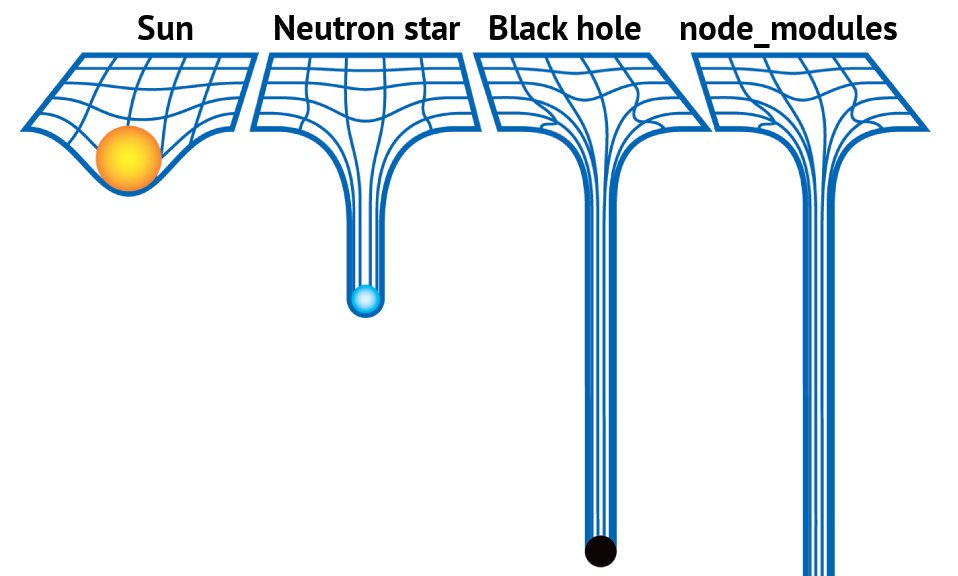
Having many dependencies is not the problem by itself. The real question is this: when a project is built, are the installed dependencies exactly the same ones that were used during development, testing, and release validation?
If the answer is no, a tiny feature change can ship with unexpected behavior caused by a dependency update that nobody reviewed. The goal of dependency management is not to reject third-party packages. The goal is to make dependency changes visible, controlled, and reversible.
package.json cannot pin the complete dependency tree
Frontend projects usually declare dependencies in package.json:
{
  "dependencies": {
    "some-package": "^2.0.0"
  }
}
Semantic Versioning splits a version into X.Y.Z:
Xis the major version, usually used for incompatible changes.Yis the minor version, usually used for backward-compatible features.Zis the patch version, usually used for backward-compatible fixes.
The full specification is here: Semantic Versioning.
^2.0.0 does not mean “always install 2.0.0”. It means npm can install a compatible version in the allowed range. In practice, that may be 2.1.0 or 2.3.4, as long as it stays within the compatible 2.x range. ~2.0.0 is more conservative and usually allows patch-level changes.
This design is reasonable. Patch releases fix bugs, minor releases add capabilities, and projects can benefit from maintenance automatically. But it relies on one assumption: package maintainers publish compatible releases and do not introduce security or quality problems in later versions.
That assumption is not always true. Maintainers can publish by mistake, underestimate a breaking change, or intentionally publish destructive code. The colors.js/faker.js incident is a well-known example: a maintainer released versions with disruptive behavior, and many downstream dependency chains were affected. Supply chain incidents like that cannot be solved by trusting version numbers alone.
There is another problem: pinning only direct dependencies is still not enough.
Transitive dependencies are part of every build
Writing exact versions in package.json looks safer:
{
  "dependencies": {
    "some-package": "2.0.0"
  }
}
That only pins dependencies declared directly by the project. A frontend package often depends on other packages, and those packages depend on more packages. Open the node_modules directory of a real project and the structure often looks like this:
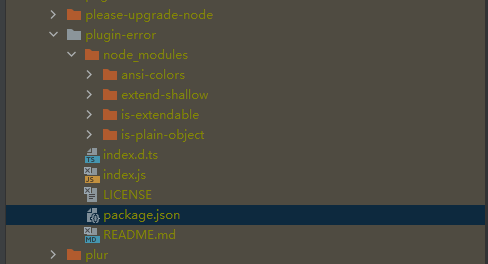
Even if every direct dependency avoids ^ and ~, the dependencies of those dependencies may still use ranges. What actually participates in a build is the whole dependency tree, not just the few lines visible in package.json.
So the thing worth locking is not “a few direct versions”. It is the complete dependency tree resolved during a known install.
Lockfiles preserve dependency resolution
npm’s package-lock.json, pnpm’s pnpm-lock.yaml, and Yarn’s yarn.lock solve the same core problem: they record the full dependency resolution result of an install.
For example, package-lock.json records:
- The exact version of each package in the dependency tree.
- Where each package was resolved from, such as a registry tarball or a git commit.
- Integrity information for package contents.
- The relationship between dependencies.
npm’s documentation also states that package-lock.json is intended to describe a dependency tree so teammates, deployments, and CI can install the same tree. That is why lockfiles should be committed to source control.
With a lockfile, a project moves from “resolve dependencies from version ranges every time” to “reproduce a previously resolved dependency tree”. This is the foundation for reproducible builds.
Here, “reproducible build” does not mean a fully cryptographically proven build process. In this context, it means meeting several practical engineering expectations:
- The same commit installs the same dependencies on different machines.
- CI, testing, and deployment use the same dependency resolution result.
- Dependency changes appear as lockfile diffs during code review.
- A build failure can be reproduced by checking out a specific Git commit.
Choose npm install or npm ci by intent
npm install and npm ci both install dependencies, but they are meant for different situations.
npm install is the command for normal dependency maintenance. It reads package.json and package-lock.json. If the versions in the lockfile still satisfy the ranges in package.json, npm can keep using the locked versions. If not, npm resolves dependencies again and updates the lockfile.
So npm install fits these cases:
- Initial dependency installation.
- Adding a dependency.
- Removing a dependency.
- Upgrading a dependency.
- Changing a dependency range.
npm ci is better suited for automated environments. According to npm’s documentation, it is designed for test platforms, continuous integration, and deployment. Its key behaviors are:
- It requires an existing
package-lock.jsonornpm-shrinkwrap.json. - If the lockfile does not match
package.json, it fails instead of updating the lockfile. - It removes the existing
node_modulesdirectory before installation. - It does not write to
package.jsonor the lockfile. The install is frozen.
That is exactly what CI/CD needs. If dependency descriptions are inconsistent, the build should expose the problem instead of silently generating a new dependency graph on the build machine.
For npm projects, a basic workflow can be:
# When intentionally adding or upgrading a dependency
npm install some-package

# After cloning, switching branches, reinstalling dependencies, debugging, CI, and deployment
npm ci
If the original package-lock.json was generated with npm configuration that affects the dependency tree, such as legacy-peer-deps or install-links, those options should be saved in a project-level .npmrc and committed to the repository. Otherwise, npm ci may fail in another environment.
Use frozen installs with pnpm
pnpm follows the same idea with different commands.
pnpm projects commit pnpm-lock.yaml. In CI environments, if a lockfile exists but would need to be updated, pnpm install fails by default. The explicit command is:
pnpm install --frozen-lockfile
The intent is direct: do not update the lockfile; if the lockfile and manifest are inconsistent, fail the install.
For pnpm projects, a basic workflow can be:
# When intentionally adding or upgrading a dependency
pnpm add some-package

# After cloning, switching branches, reinstalling dependencies, debugging, CI, and deployment
pnpm install --frozen-lockfile
For monorepos, workspace scope matters too. A dependency change can affect multiple packages, and lockfile diffs can become larger. In that kind of project, dependency upgrades should be separated from normal feature changes, reviewed independently, and verified explicitly.
Pin the package manager and Node.js version
A lockfile pins the dependency tree, but different package managers and different major versions can have different resolution behavior and lockfile formats. If some developers use npm, others use pnpm, or a project is edited with very different pnpm versions, the lockfile can change for reasons unrelated to the actual application.
A project should pin this information:
{
  "packageManager": "pnpm@10.10.0",
  "engines": {
    "node": ">=24 <25"
  }
}
packageManager tells tooling which package manager and version the project expects. Used with Corepack or a team convention, it reduces unnecessary lockfile churn caused by local tooling differences.
Node.js should also be pinned. A project can use .nvmrc, Volta, asdf, mise, or CI configuration for that. The specific tool is less important than the goal: development machines, CI, and deployment should share the same runtime assumptions.
Make dependency updates explicit
Reproducible builds do not mean never upgrading dependencies. Refusing upgrades forever creates another problem: security fixes are missed, ecosystem compatibility drifts, and the eventual upgrade becomes much more expensive.
A healthier approach is to make dependency updates explicit:
- Avoid mixing incidental dependency upgrades into normal feature work.
- When adding or upgrading dependencies, make a separate commit so
package.jsonand lockfile diffs are easy to review. - Always use frozen installs in CI and deployment.
- Do dependency maintenance on a schedule, such as every two weeks or every month.
- After dependency upgrades, run the full test and build process, and do manual regression testing when necessary.
This keeps dependency changes out of unrelated business diffs. During review, it becomes clear which package changed, which transitive dependencies were affected, whether new install scripts appeared, and whether any dependency source changed from a registry package to a git, tarball, or URL source.
A lockfile diff does not need to be read line by line, but several signals are worth checking:
- Whether unfamiliar high-risk packages appeared.
- Whether many new transitive dependencies were added.
- Whether a package source changed from registry to git, tarball, or URL.
- Whether new
postinstall,install, orpreinstallscripts appeared. - Whether any dependency crossed a major version boundary.
- Whether the package manager version or lockfile version changed.
Tools such as npm audit, pnpm audit, and GitHub Dependabot can provide useful security signals, but audit fix --force should not be treated as a harmless automatic cleanup. It may introduce major upgrades or behavior changes. Security fixes still need to go through the normal test and release process.
Do not commit node_modules
Some people suggest committing node_modules to the repository. The motivation is understandable: if the install step is risky, put the install result under version control too.
For most frontend application projects, that is not a good default:
- Repository size grows dramatically.
- Diffs become difficult to review.
- Native dependencies can behave differently across operating systems and CPU architectures.
- Install scripts, generated files, and symlinks are not always a good fit for Git.
- Daily development and code hosting become slower and less pleasant.
Large projects such as Chrome have their own engineering constraints and infrastructure. Their choices should not be copied directly into normal web projects. The more common practice is still: commit the lockfile, do not commit node_modules, and use frozen installs in CI and deployment to reproduce dependencies.
Use this lockfile workflow
The practical checklist is:
- Commit
package-lock.json,pnpm-lock.yaml, oryarn.lock. - Do not commit
node_modules. - Use
npm ciorpnpm install --frozen-lockfilein CI, testing, and deployment. - Prefer frozen installs after cloning, switching branches, or reinstalling dependencies locally.
- Use
npm install,pnpm add,pnpm update, and similar commands only when intentionally adding, removing, or upgrading dependencies. - Keep dependency changes in separate commits when possible.
- Pin Node.js and the package manager version to avoid lockfile churn caused by tooling differences.
- Commit project-level npm or pnpm configuration, especially settings that affect dependency resolution.
- Use audit and Dependabot-style tools for security signals, but send fixes through normal testing and release flow.
- Think before adding a dependency. A smaller dependency surface is easier to maintain.
Frontend dependency management cannot eliminate every supply chain risk. But it can turn risk from “something random that happened during a build” into “a visible change that appeared during code review”. That is the main value of lockfiles and frozen installs.
Loading discussion...
Discussion failed to load. Reload