Package Size Governance for Large Mini Programs: Lessons from Didi
A review of Didi Mini Program package size optimization, covering size budgets, dependency analysis, subpackages, npm dependency placement, and architecture tradeoffs.
In the second half of 2019, Didi needed to migrate the WebApp entry inside WeChat Wallet and Alipay’s grid menu into Mini Programs. This was not a simple wrapper change. Ride hailing, bus, designated driving, bike, hitch, car services, and other business lines all had to live inside one Mini Program.
The first major engineering problem was package size.
Mini Program platforms impose package size limits, especially on the main package and each subpackage. Didi’s home page also carried many high-frequency workflows: choosing a service, entering origin and destination, switching car types, keeping state, and entering orders. The more business logic concentrated on the home page, the more code was pulled into the main package.
Chinese version of this article
This article is not only a list of optimizations. It is a review of a reusable method: when a Mini Program grows from one business line into a multi-business, multi-team, dependency-heavy application, package size control has to become governance rather than occasional cleanup.
Define the Problem First
When package size is close to the limit, the first reaction is often to delete code, compress images, or enable minification. These are useful, but they only address the surface.
Large Mini Program package size problems usually come from three sources:
- Asset size: images, videos, fonts, JSON, static configuration, and other resources included in the package.
- Dependency size: shared libraries, polyfills, protocol files, component libraries, and duplicated cross-business dependencies.
- Architecture size: product structure forces many business lines into the home page, so the code cannot be delayed even if it is technically modular.
The first two can often be improved by tooling. The third requires product, architecture, and build-system decisions. Without this distinction, teams can spend a lot of time on local optimizations without solving the main package pressure.
Step 1: Make Size Visible
Before optimization, three questions need clear answers:
- What is inside the main package?
- Which modules are largest?
- Which dependencies are duplicated or emitted to the wrong package?
Didi Mini Program was built with Mpx, whose build pipeline is based on webpack. That made it possible to use tools such as webpack-bundle-analyzer to inspect the output.
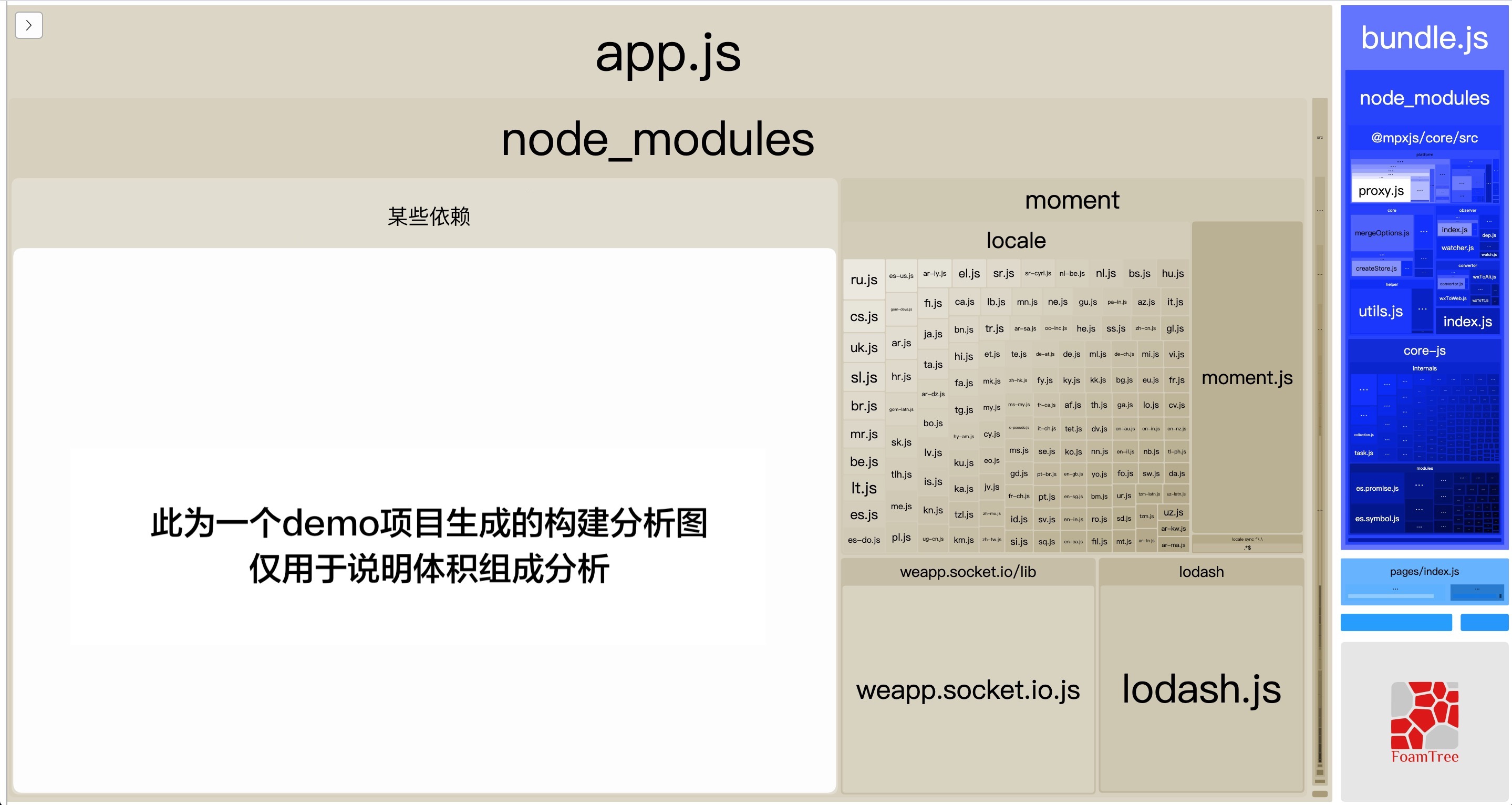
The value of this step is not only finding large files. It creates a shared language for multiple teams. If size discussions depend on intuition, it is hard to coordinate. When a chart shows duplicated dependencies or a subpackage-only module in the main package, the conversation becomes much more concrete.
The reusable rule is simple: produce a size report before making optimization decisions.
Step 2: Do Basic Optimization, But Do Not Stop There
Basic optimizations include:
- Minify JavaScript, CSS, templates, and JSON.
- Remove unused code and assets.
- Move images and videos to a CDN when possible.
- Use tree shaking, module deduplication, and on-demand imports.
- Control polyfills and shared runtime size.
- Avoid installing the same dependency multiple times because of version drift.
Mpx can reuse many webpack ecosystem optimizations, and it also includes Mini Program-specific work such as page-level dependency collection, runtime compression, shared style reuse, and subpackage module extraction.
These optimizations are necessary, but they usually only make the package thinner. If the product architecture forces all business logic into the main package, minification alone will not provide enough room for long-term growth.
So the goal of basic optimization is to remove obvious waste and buy time for structural work.
Step 3: Move Low-Frequency Pages into Subpackages
The idea of subpackages is straightforward: pages not needed at startup should not occupy main package space. They can be downloaded when the user navigates to them.
In Didi Mini Program, trip history, origin/destination selection, profile pages, and other non-home pages were early candidates for subpackages.
The initial subpackage work released several hundred KB from the main package. The number was not huge, but it proved an important point: if project structure can cooperate with subpackage rules, main package size becomes manageable.
Subpackage design should follow user paths:
- Startup-critical content stays in the main package.
- Pages reached after the first screen go into subpackages.
- Independent business pages go into business subpackages.
- Shared capabilities enter the main package only when truly shared.
- Modules used by only one subpackage should be emitted with that subpackage.
Step 4: Fix npm Dependencies That Leak into the Main Package
The difficult part is that real projects do not place all code under page directories. Many features are integrated as npm packages.
Early subpackage rules often depended on file paths: files under a subpackage directory went into that subpackage, and everything else went into the main package. This worked for page files, but not for modules under node_modules.
For example, a trip-history subpackage might use a socket library only inside that subpackage. If the library came from npm, its path was under node_modules. A path-only rule could still emit it into the main package.
That creates a frustrating situation: business code has moved into a subpackage, but its dependencies remain in the main package.
Mpx later added more precise dependency ownership analysis:
- Track which subpackages reference each module during build.
- Emit a module to a subpackage if only that subpackage uses it.
- Avoid forcing resources into the main package if they are shared only by subpackages.
- Generate subpackage-specific cache groups for modules reused inside the same subpackage.
The core idea is: module ownership should be determined by usage, not only by file location.
This is critical for large Mini Programs. In multi-team projects, business features are often delivered as npm packages. If the build system cannot understand actual usage scope, the main package will keep absorbing dependencies that do not belong there.
Step 5: Know When Technical Optimization Reaches Its Limit
As the business kept growing, Didi Mini Program hit a harder problem: every business line needed expression on the home page.
This is different from many e-commerce or content Mini Programs. An e-commerce home page can be mostly an entry point, while details, orders, search, and profile pages can be separated. A mobility home page has to carry service selection, origin and destination, car types, maps, prices, status, and recommendations. Users also expect smooth switching between services.
That means each business line needs a home-page component. If the component must appear on the home page, it is hard to move it into a normal subpackage.
At that stage, the main package roughly consisted of:
- Shared base libraries: framework runtime, component library, polyfills, communication libraries, and shared business dependencies.
- Home business code: home-page components and state logic from different business lines.
Continuing to remove a few KB was no longer enough. The real conflict was between product architecture and package limits.
That is the limit of pure technical optimization. After that point, package size work becomes an architecture decision.
Step 6: Use a Cover Page to Change Main Package Responsibility
The final solution was to make the startup page a lightweight cover page.
The cover page only handled startup, brand display, and navigation. The real business home page moved into a subpackage. When users opened the Mini Program, they first entered the lightweight main package page, then navigated into the business home subpackage.
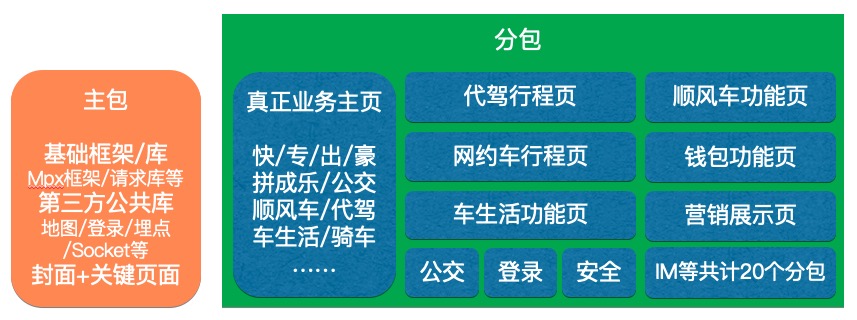
This did not reduce total code size. It changed where code lived:
- The main package kept only startup-required and truly shared capabilities.
- Complex home business logic moved into a home subpackage.
- Future business growth mostly consumed home subpackage space instead of main package space.
The tradeoff was clear: first business-screen display could become slower because another subpackage had to load. But compared with blocking business iteration because of main package limits, the tradeoff was acceptable. Mini Program subpackage caching also helped reduce the real user impact.
Reusable Methodology
The Didi package size work can be generalized into a sequence.
1. Set Budgets Before Hitting the Limit
Do not wait until the main package is close to the platform limit. Define budgets early:
- Main package budget.
- Per-subpackage budget.
- Shared base library budget.
- Per-business integration budget.
- Asset budgets for images, JSON, protocol files, and static resources.
Budgets are not meant to block business. They make shared cost visible.
2. Make Every Build Show Size Changes
Package size should be monitored automatically:
- Main package and subpackage sizes.
- Size diff compared with the previous build.
- New large dependencies.
- Duplicated dependencies.
- Subpackage-only dependencies entering the main package.
Without data, size governance becomes a one-time campaign.
3. Treat Subpackages as Architecture, Not Configuration
Subpackages are not just fields in configuration. They affect module boundaries, directory structure, npm package design, and page navigation.
When a business team integrates a feature, it should answer:
- Which code is startup-critical?
- Which pages can be downloaded later?
- Will this dependency pollute the main package?
- Is this component truly shared?
- Are there unnecessary dependencies between subpackages?
4. Determine Dependency Ownership by Usage
In real projects, file path is not module ownership. npm packages, shared components, and utilities need to be assigned based on the dependency graph.
If a module is used by only one subpackage, it should not enter the main package just because it lives under node_modules.
5. Product Structure Can Defeat Technical Optimization
If the home page must carry every business, the main package will grow. This cannot be solved only by minification and tree shaking.
At that point, redefine the responsibility of the main package. Does it need to contain the full home page? Can it be a startup shell? Can the business home page be loaded as a subpackage? Is the user experience tradeoff acceptable?
Large-scale performance work often becomes architecture work in the end.
Conclusion
Didi Mini Program package size optimization was not a set of isolated tricks. It was a staged governance path:
- Visualize package composition.
- Remove waste through minification, deduplication, CDN usage, and cleanup.
- Move low-frequency pages into subpackages.
- Govern npm dependencies and subpackage ownership.
- Change main package responsibility with a cover-page architecture when technical optimization reaches its limit.
The most reusable lesson is the order of judgment: diagnose first, then optimize; remove waste before changing structure; solve technical issues first, then make product and architecture tradeoffs.
Large Mini Programs do not stay small by accident. They need budgets, tooling, build-system support, business boundaries, and continuous monitoring.
Loading discussion...
Discussion failed to load. Reload