From One Model Call to an Agent: How LLMs, RAG, Tools, Loops, and ReAct Fit Together
LLMs, prompts, context, RAG, tools, workflows, loops, ReAct, memory, and agents belong to different layers. This guide explains what each one does and how they fit into a working system.
Connect an application to a model API and it can chat. Add a search endpoint and the product description starts saying RAG. Give the model a few tools and the word agent appears. Put a while loop around it, and ReAct sometimes joins the list.
The terminology grows faster than the code.
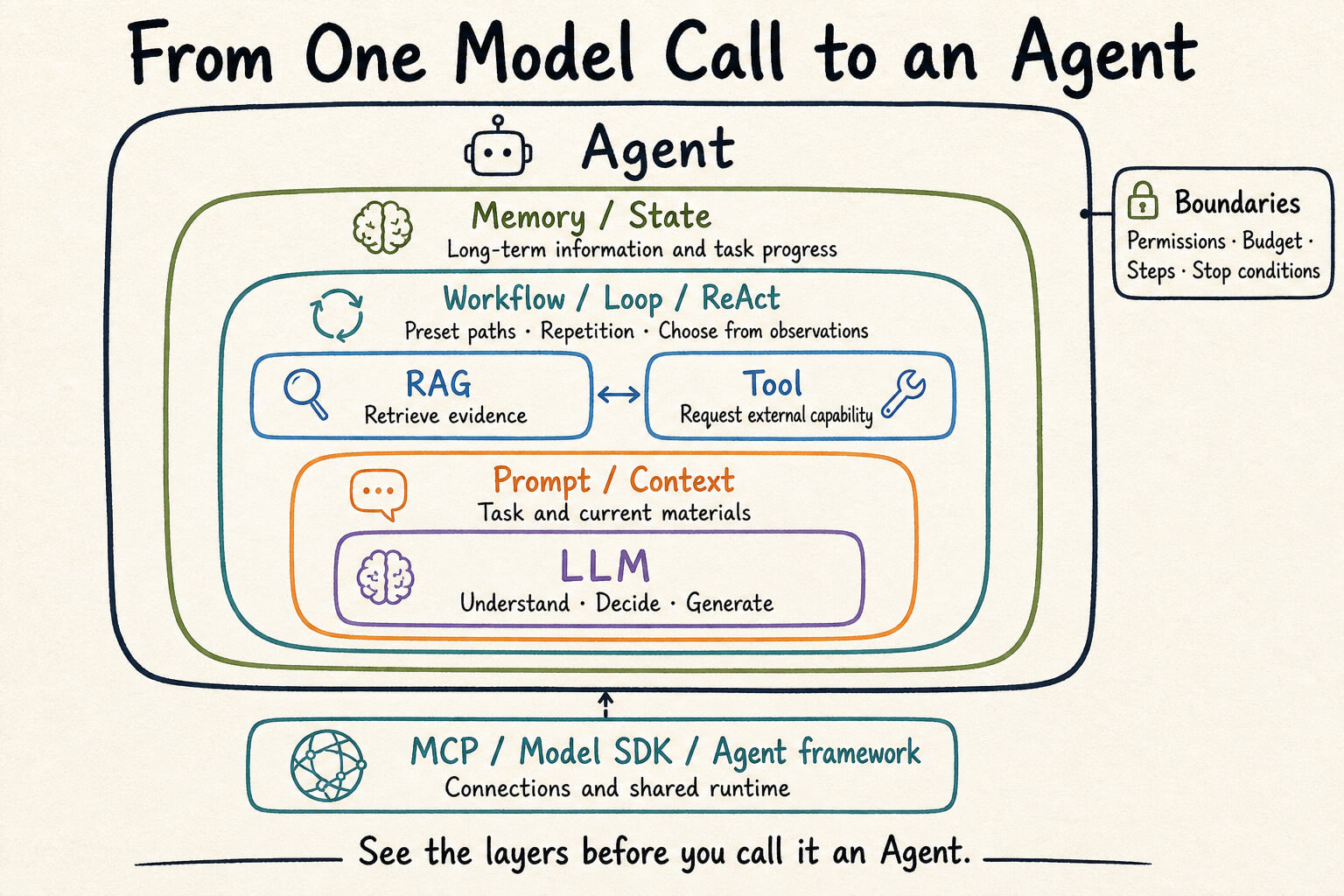
The trouble is that these terms do not describe the same layer. A large language model (LLM) is the model. Prompt and context are inputs. Retrieval-augmented generation (RAG) and tools add external information or capabilities. Workflows, loops, and ReAct organize execution. An agent is the running system that combines those parts. Protocols and frameworks such as the Model Context Protocol (MCP) and Pi sit farther outside.
Four questions cut through most of the naming: what can the model see on each call, who chooses the next step, who executes external actions, and what makes the task stop?
Start there and the map becomes much less mysterious.
Chinese version of this article
An LLM is the model, not the application
A large language model is the generation and decision component inside an AI application.
At the training level, it predicts later tokens from earlier ones. At the application level, it receives messages and produces text or structured output. The act of running the model to produce that output is inference.
The smallest useful call may contain one instruction:
Summarize the following passage in three sentences.
The model receives the instruction and source text, returns an answer, and the call ends. This is an ordinary LLM call. It needs no tool, loop, or agent.
The model is not the rest of the application. The interface, user identity, database, permissions, conversation history, retries, and billing all belong to surrounding systems. A chat interface may appear to remember earlier messages because the application or model service stores them and supplies relevant parts on later calls.
From the model’s point of view, the current output depends on the current context. Its parameters do not acquire a private memory of one user because it answered that user yesterday.
Prompt defines the task; context defines what the model can see
Developers use prompt and context as if they mean the same thing. Their responsibilities are different.
A prompt describes the task: the role, goal, rules, and output format. System instructions, the user’s request, and format constraints belong here.
APIs do not use the word prompt consistently. Some use it for the entire model input. I use a narrower definition in this article because it makes the engineering responsibilities easier to see: prompt expresses the task, while context contains everything available to the model on that call.
Context may include:
- System instructions and the user’s request
- Source material to process
- Conversation history
- Retrieved documents
- Tool definitions
- Results returned by earlier tool calls
The context window sets the maximum number of tokens a call can contain. A token is the model’s basic text unit. It may be one Chinese character, part of an English word, or punctuation, so token count and character count are not interchangeable.
Prompt engineering asks how to express the instruction. Context engineering also asks where the material comes from, when to include it, how long to retain it, and what to discard when the budget runs out.
Think of an LLM as someone working at a desk. The prompt is the assignment. Context is every document on the desk. The context window is the desk’s surface area. A larger desk holds more paper, but emptying the archive onto it does not improve judgment.
RAG adds external evidence before generation
Once trained, a model does not automatically know a company’s private policies, breaking news, or the latest row in a database. Retrieval-augmented generation adds that information at inference time.
Consider a question about a company’s travel expense limit. The model can guess from its training data, or the application can retrieve the relevant policy and ask the model to answer from that evidence.
The second path looks like this:
Question -> retrieve relevant material -> add it to context
         -> call the model -> generate the answer
RAG changes the material supplied to one inference. It does not change model parameters. When the policy changes, the application updates the document store instead of retraining the model.
That distinction also separates RAG from fine-tuning. RAG supplies current facts during inference. Fine-tuning changes model parameters and suits stable behavior, style, or task-specific capability. An application can use both, but they solve different problems.
RAG is not another name for a vector database. Embeddings turn content into vectors that support semantic comparison, and vector databases store and search those vectors. They are a common retrieval implementation, not the definition of RAG.
Full-text search, keyword matching, SQL queries, and direct file reads can all retrieve material for generation. If the system fetches relevant information and uses it to produce the answer, the basic retrieval-augmented structure is present.
A fixed RAG pipeline may still be an ordinary workflow. Server code can create a query, fetch the top results, and call the model once. It needs neither an agent nor ReAct.
Tools let the model request external capabilities
RAG mainly addresses missing information. Tools cover both reading and action.
Order lookup, log search, and file reads are read operations. Sending an email, creating a ticket, changing a calendar event, and starting a deployment are write operations. The model usually owns none of those permissions. It can only express an intent to call a tool.
With function calling, the application tells the model each tool’s name, purpose, and parameter schema. A shipping question may produce output like this:
{
  "tool": "get_order",
  "args": { "orderId": "1234567890123" }
}
The JSON does not query a database by itself. The runtime must validate the order ID and the current user’s permissions, execute get_order, and return the result to the model for the final response.
The model proposes what it wants to call. The runtime decides whether the call is allowed and how to execute it. Without that division, any text that resembles a command could become an instruction to the production system. That arrangement eventually produces an incident.
Tools and RAG can overlap. If knowledge search is exposed as a tool and its result enters the generation process, the operation is both tool use and RAG. Sending an email is tool use, but it is not usually called RAG because it changes an external system instead of retrieving evidence for an answer.
One tool call does not automatically create an agent. A fixed sequence that looks up one order and writes one response is still a workflow.
Workflow, loop, and ReAct answer three different questions
Comparing workflow, loop, and ReAct as alternatives creates confusion. They describe three different properties of execution.
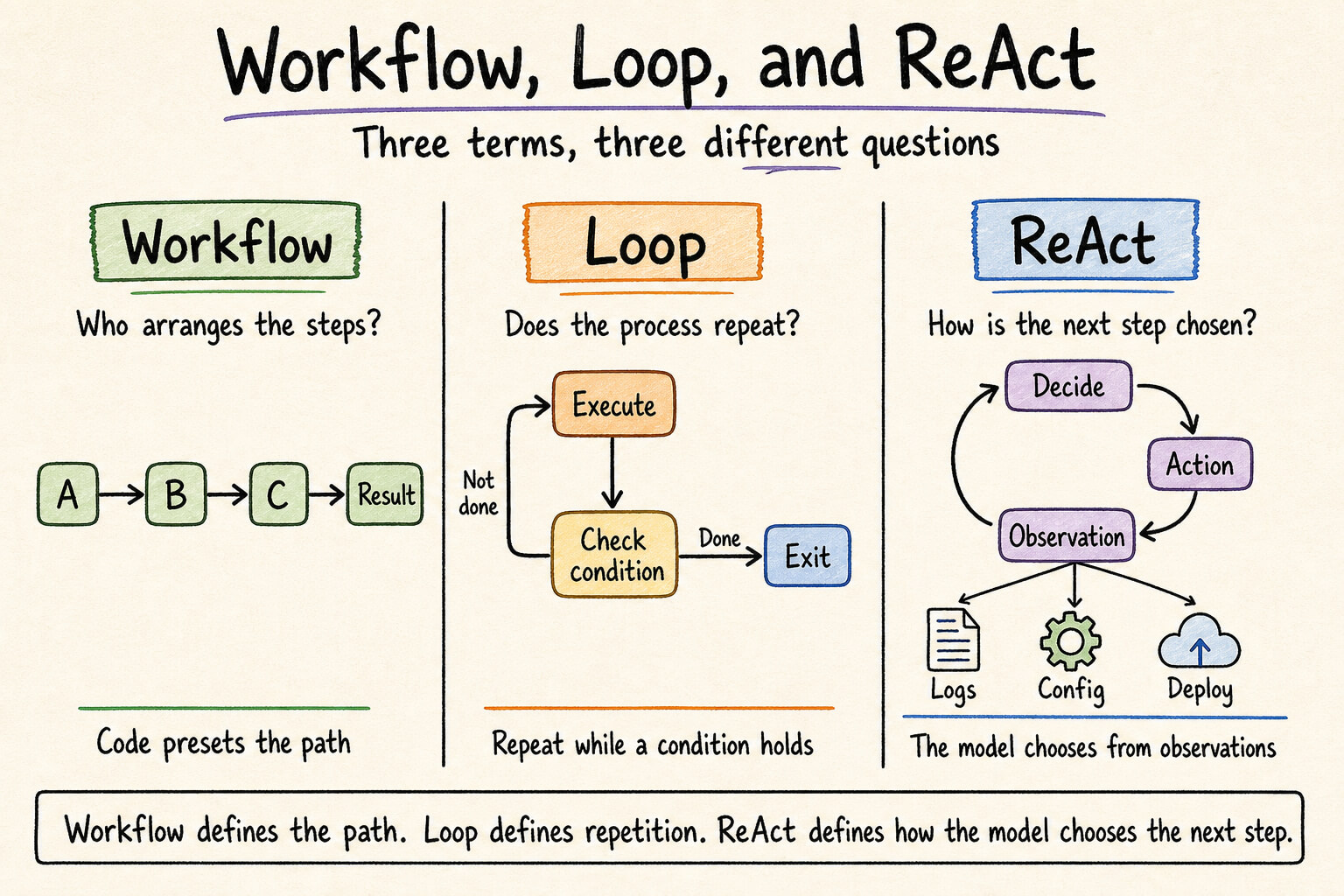
A workflow asks who arranges the steps. A production incident report might always check service status, read recent errors, collect deployment records, and ask the model to write a report. Code has already fixed the path. The model only processes material at selected points.
A loop asks whether the process repeats. Three retries form a loop. Polling a task until completion forms a loop. Asking a model to revise code until tests pass also forms a loop. Repetition is a control structure, not intelligence.
ReAct asks how the model chooses the next step inside a loop. The name comes from Reasoning and Acting. The model evaluates current information, selects an Action, receives an Observation, and then evaluates the new state.
An incident investigation might follow this route:
Observe the alert
-> inspect error logs
-> find database connection timeouts
-> inspect connection pool settings
-> find a recent configuration change
-> inspect deployment records
-> produce a diagnosis
The outer runtime continues or stops the loop. The model selects each Action from the latest Observation. Server code does not prescribe the query order in advance; the evidence changes the path.
A loop is not the same thing as ReAct. A fixed workflow can run inside a loop, and a retry loop needs no model at all. ReAct is one model-driven decision pattern inside a loop. It is not the only way to build an agent.
ReAct also does not require an application to store a long chain of thought. A short action reason, tool arguments, and observations are enough to reconstruct the operational path. Auditing should focus on what the model requested, what the system returned, and which rule allowed execution to continue.
An agent combines the model, tools, state, and runtime
Agent has no boundary that every vendor or developer accepts. Some products add the word as soon as a model calls one tool. An implementation still needs a definition that maps to code.
I find this one useful: an agent is a running system that keeps making decisions and taking actions toward a goal. A production agent usually contains these parts:
- Model: interprets the current state and chooses the next step
- Instructions and context: supply the goal, rules, and current material
- Tools: read information or change external systems
- State: records task progress and prior events
- Control loop: moves between model decisions, Actions, and Observations
- Stop conditions: define completion, failure, timeout, and human handoff
- Boundaries: limit permissions, budget, steps, and dangerous operations
An imprecise but memorable formula is:
Agent = Model + Context + Tools + State + Loop + Boundaries
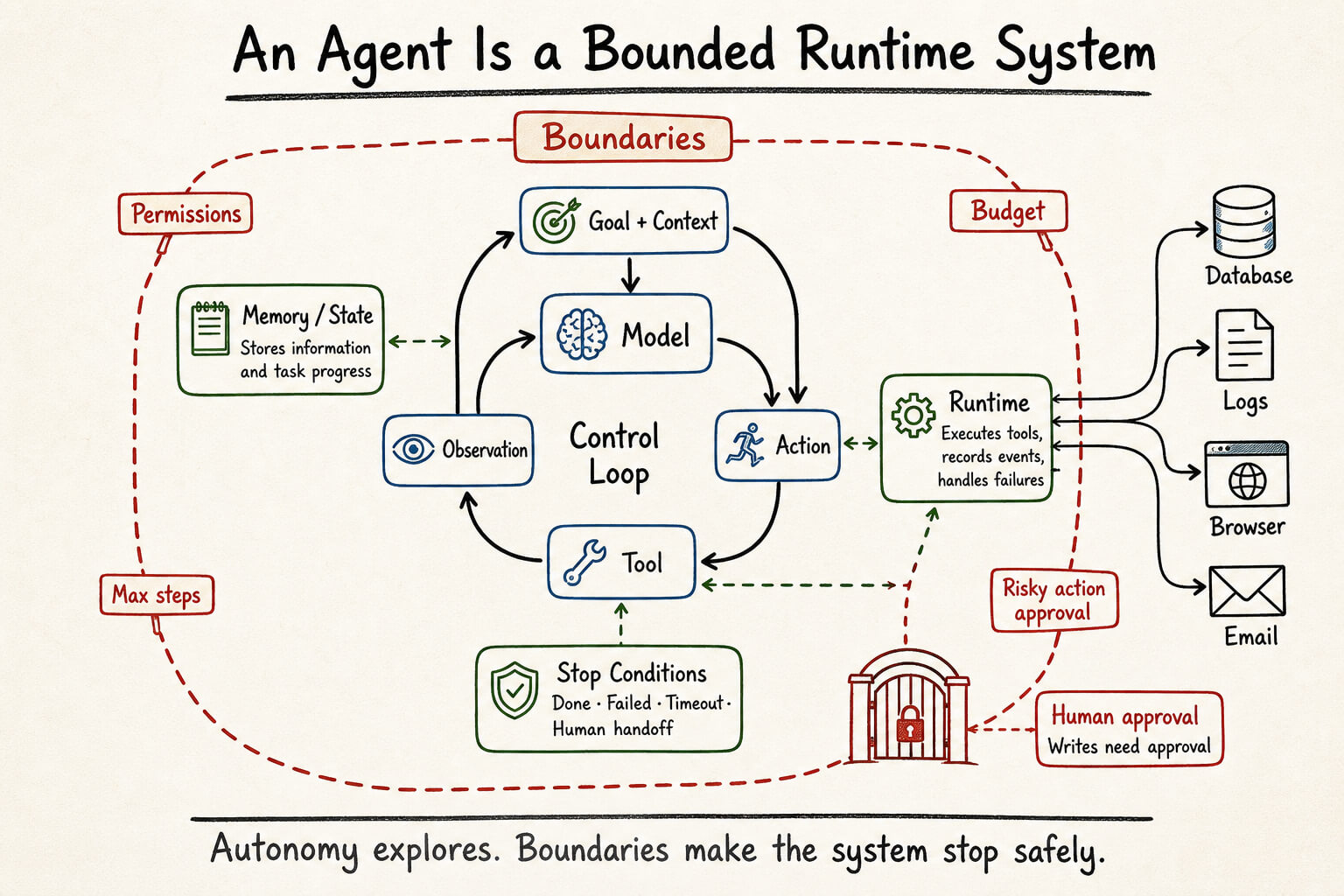
For a production incident, an agent may read metrics, logs, configuration, and deployment history. It can preserve clues across several queries and submit a diagnosis. Code still limits the total time, maximum steps, and available tools. A write operation can pause for human approval.
Maximum autonomy is not the goal. Production systems need read-only tools, call budgets, timeouts, approvals, validation, idempotency, and rollback. None of this is glamorous. It decides whether a failed agent leaves behind a failed task or a damaged system.
Workflow and agent are not binary categories. The more choices code fixes in advance, the closer the system is to a workflow. The more paths the model can choose based on current state, the more agentic it becomes. Reliable systems combine both: the model explores, while fixed code validates, approves, and executes.
Memory is not a larger context window
An agent that works across several calls or tasks needs to preserve some information outside the model invocation.
Context is what the model can see now. Memory is information the application stores and may retrieve later. It can live in a database, file, or dedicated memory service. Saving it does not make the model aware of it. The application must retrieve the relevant part and place it in the current context.
Application memory usually includes at least three categories:
- Conversation state: what has been said in the current conversation
- Domain memory: user preferences, business facts, document summaries, and other durable information
- Runtime state: current task position, completed tool calls, and failure count
Keeping every historical message in every later call is not memory design. It is an ever-growing context. Memory design must decide what to store, when to retrieve it, which source wins when records conflict, and how stale information expires.
MCP, Pi, and agent frameworks are infrastructure
Once the model, input, tools, and orchestration are separated, protocols and frameworks become easier to place.
The Model Context Protocol defines a standard way for a host to connect to external tools, resources, and prompts. It answers how capabilities are exposed and connected. It does not choose the agent’s goal, loop strategy, or permission boundary.
Projects such as Pi, LangChain, and Mastra handle some shared engineering work. They may normalize model providers, organize messages, declare tools, run loops, record traces, or connect to external services. Their scope differs, so the label Agent Framework does not say enough by itself.
Pi here means the libraries around @earendil-works/pi-ai, not Raspberry Pi. In one project, I evaluated pi-ai as a model integration layer. It normalizes providers, messages, streaming, tool calls, and usage. A related agent runtime can remove part of the hand-written loop and tool-execution code.
The domain rules remain in the application: which data a tool may read, which actions require approval, and what result counts as complete. A framework supplies reusable runtime pieces. MCP standardizes connections. Neither one decides the product’s policy.
Put the concepts on one map
The concepts fit into a layered view of an LLM application:
Application goal and boundaries
└── Agent
    ├── Orchestration: Workflow / Loop / ReAct
    ├── External capabilities: RAG / Tool
    ├── State: Memory / Runtime State
    ├── Current input: Prompt / Context
    └── Decision and generation: LLM

Infrastructure: Model SDK / Agent framework / MCP
The same map can be compressed into a table:
| Concept | Responsibility in the application |
|---|---|
| LLM | Interpret input, make decisions, and generate output |
| Prompt | Describe the current task, rules, and output format |
| Context | Supply everything visible to the model on the current call |
| RAG | Retrieve external material and add it to generation |
| Embedding / Vector DB | Represent and search material by semantic similarity, as one RAG implementation path |
| Fine-tuning | Change model parameters and stable behavior through training |
| Tool / Function Calling | Let the model express an intent to use an external capability |
| Workflow | Arrange steps along a path defined in code |
| Loop | Repeat execution while a condition holds |
| ReAct | Let the model choose the next Action from Observations |
| Memory / State | Store information and task progress outside model calls |
| Agent | Combine the model, tools, state, loop, and boundaries into a running system |
| MCP | Connect a host to external capabilities through a standard protocol |
| Agent framework | Supply shared model integration, loop, and tool-execution infrastructure |
Questions worth asking about an agent
When a feature calls itself an agent, the name is less useful than a few implementation questions:
- How many model calls can one task make, and what context does each call receive?
- Does code fix the retrieval sequence, or can the model choose another query from the result?
- Who executes tools, and where are arguments and permissions validated?
- Where is intermediate state stored, and can the task recover after failure?
- What stops the loop, and are there limits on steps, time, and cost?
- Which actions run automatically, and which ones require human approval?
If a system cannot answer these questions, a demo may still work. Keeping it running in production will be harder. Agent engineering becomes difficult after the first model call, when context grows, tools fail, state must survive, and permissions begin to have consequences.
A real implementation
Concepts are more useful when they eventually meet code.
I built a whole-book review feature for Novevia, an AI fiction-writing application. The first version sent the setting, chapters, facts, and memories to the model in one request. Two model calls took more than eight minutes. I later replaced that request with a manifest and let the model retrieve chapters, story routes, and facts as needed.
That implementation contains RAG, tool use, and a bounded ReAct-style loop. Its task system also supplies state, stop conditions, read-only permissions, plan validation, human approval, recovery, and rollback. Calling the whole feature a constrained agent is reasonable.
I Stopped Sending the Whole Book to the Model records the implementation and its tradeoffs. It is one business-specific design, not the definition of these concepts. The concepts are a map for reading the code, not a set of prestigious labels to attach to it.
The next time a feature calls itself an agent, look for three things: who chooses the next step, where state lives, and who makes it stop. Those answers say more than the name on the product page.
Loading discussion...
Discussion failed to load. Reload