How Stripe Models Subscriptions: Plans, Invoices, and Payments
Follow a cloud storage plan through Stripe Billing and Payments to see why products, prices, subscriptions, invoices, and payments need separate records, and what happens during upgrades, cancellations, and failed renewals.
After a trip, a phone holds hundreds of new photos and dozens of videos. Halfway through the upload, the cloud storage service runs out of space. Its owner wants to upgrade, but has already paid this month’s fee. How much should the upgrade cost?
The two prices on the pricing page cannot answer that question. The system needs to know the current plan, how much has been paid, how much time remains, and which rules the business applies to upgrades. Behind the button are subscription, invoice, and payment records that must agree.
Canceling renewal raises a different problem. A customer may want to stop paying, but their photos are still on the service, and this month’s storage has already been paid for. A payment’s success or failure cannot, by itself, tell the application when access should end or whether downloading files should still be allowed.

The previous article discussed when a subscription makes sense for a business. Here, the example is a cloud storage service with a Pro plan offering 1 TB for $20 a month, renewed monthly. All prices and dates are illustrative; taxes, discounts, and usage charges are excluded.
Where subscriptions fit in Stripe
Stripe Payments gives a business the means to process a payment. It can handle a request to collect $20 from a customer, any required payment authentication, and the bank’s response. Stripe Payments
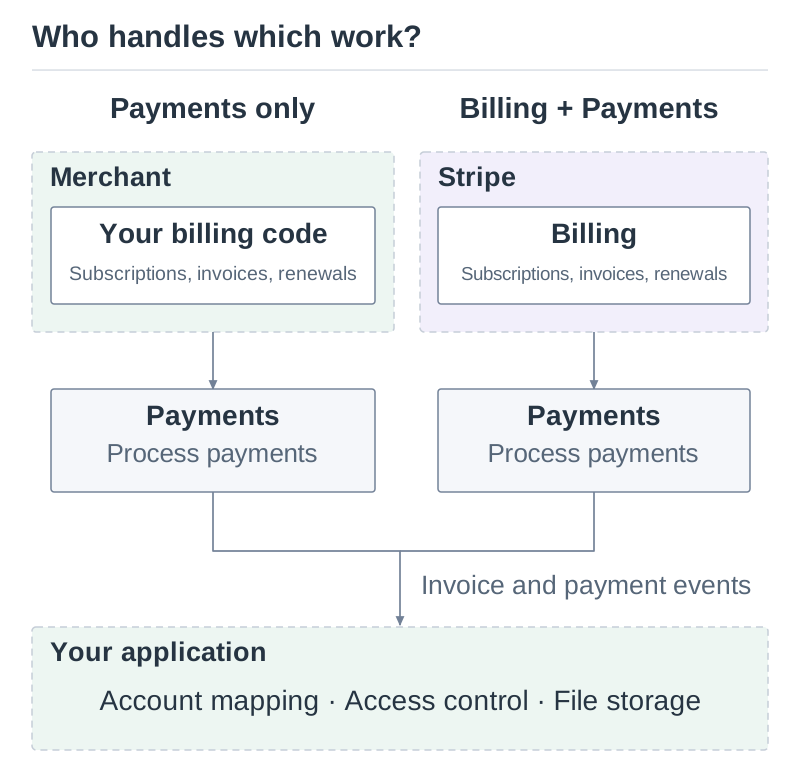
Next month, someone still has to work out which customers owe that $20. Some have changed plans, some have canceled renewal, and some have just finished a trial. If the merchant keeps those records in its own system, that system calculates the charges and asks Stripe to collect them.
Stripe Billing offers another arrangement. The merchant gives it the plans, billing intervals, and subscription records; Billing generates invoices and coordinates collection. Subscriptions is part of Billing and handles creation, renewals, changes, and cancellation. Other capabilities include payment recovery, customer self-service, and revenue reporting. Stripe Billing
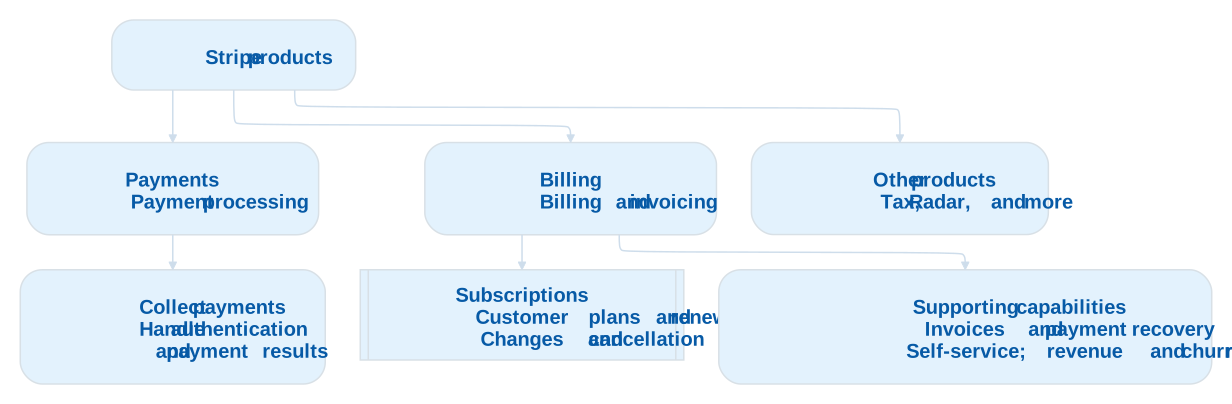
Billing’s software fees and Payments’ processing fees are charged separately. A business that needs payment processing can use Payments on its own. One that wants to maintain less billing software can also use Billing. Billing pricing
The word “subscription” has two uses here. To a cloud storage customer, it describes the service they have signed up for. Within Stripe, it also names a specific software model for managing the billing relationship. Selling a year of storage does not, by itself, require a Stripe Subscription object.
From a plan to a payment
Start by adding the Pro plan to Stripe. A Product holds the name and description of what is sold. A Price defines the amount, currency, and, for recurring prices, billing interval. Cloud Storage Pro is a Product; $20 per month is one of its Prices.
If Pro is also available for $200 per year, the merchant can add an annual Price to the same Product. Both prices buy the same storage capacity, with different amounts and payment intervals. A larger Premium plan can be another Product. Products and Prices also work with one-time purchases; they are not exclusive to subscriptions. Products and prices
A customer chooses monthly Pro on September 1. The system creates a Subscription linking that customer to the monthly Price and tracking the billing period and subscription status. Someone who signs up on September 10 has a separate subscription. The two customers use the same product, but can renew on different dates and cancel independently.
Next comes the invoice. With no trial, the first customer owes $20 for the first month, so Stripe generates an Invoice for the subscription. It records the charges due for that period. Subscription invoices
An invoice can exist before the money arrives. Stripe uses a PaymentIntent to track the payment through its lifecycle: it may succeed, require the customer to complete bank authentication, or fail because of insufficient funds. Keeping invoices and payments separate lets the system distinguish the amount owed from what has been paid. PaymentIntents
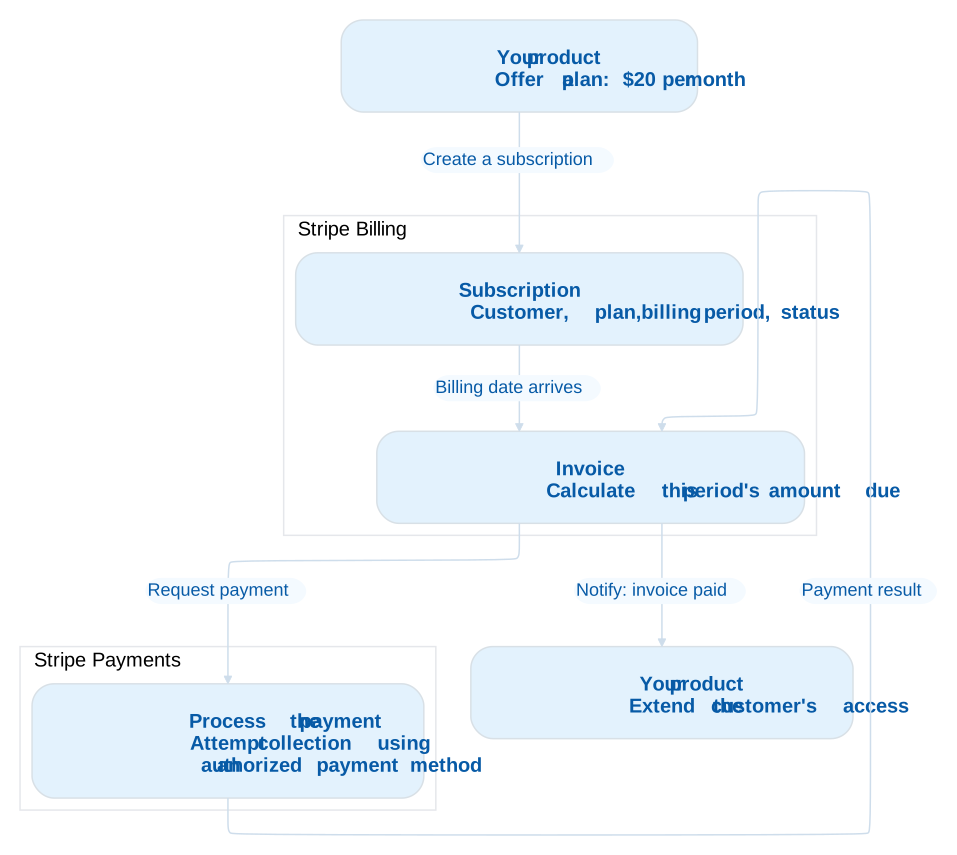
At renewal on October 1, the system normally keeps the existing Subscription, creates an invoice for the new period, and processes another payment. A customer can stay on one subscription for years while it accumulates dozens of invoices and associated payment records. The subscription tells the merchant which plan the customer uses now; the invoices and payments show what happened in each period. Subscription lifecycle
A single is_member field on the user record loses those distinctions. Someone with an unpaid invoice and someone who chose to cancel could both become false. Someone who has turned off renewal but still has paid time left does not fit comfortably into either value. The following cases show why that matters.
Upgrades, cancellations, and unpaid renewals
What happens to the fee already paid?
Photos and videos accumulate. A child’s birthday adds another batch of recordings. When 1 TB is no longer enough, the customer can switch from Pro to Premium at $40 a month.

Suppose the customer has paid the $20 fee and upgrades exactly halfway through the billing period. The merchant allows an immediate upgrade, keeps the renewal date, and charges for the remaining time. Half of the old plan is unused, worth $10. Half of the new plan costs $20. After the credit, the customer owes another $10. The next full period costs $40.
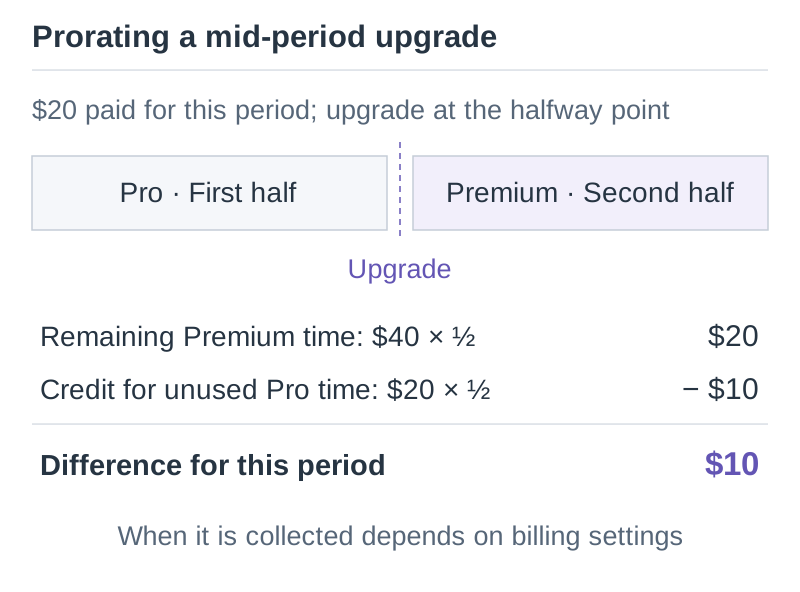
Stripe calls this calculation proration. The actual amount depends on the time of the change and other settings; the diagram uses half a period to keep the arithmetic simple. Once the difference has been calculated, there is still a decision about which invoice should contain it and when to collect it. Creating proration items does not mean that payment has already been attempted. Prorations
The merchant can also require successful payment before applying the upgrade. Stripe’s pending updates support eligible changes of this kind, so a plan does not change while its payment remains unresolved. Letting someone upgrade now and pay later, or waiting until the next period to change plans, is a business decision. Pending subscription updates
Turning off renewal leaves paid time to use
Another customer paid $20 on September 1, then decides on September 20 to stop using the service. They begin copying their photos to an external drive.
If the agreement is to stop at the end of the paid period, they should retain access until October 1. Stripe can record this with cancel_at_period_end=true: the subscription continues for the current period and then ends. Removing access when the customer clicks “Turn off renewal” would take away roughly ten days they have paid for, and could interrupt the file transfer. Canceling subscriptions

A refund for the current period is a separate matter; disabling renewal does not automatically return the month’s payment. The storage product must also decide how long to allow downloads, when to restrict uploads, and how long to retain files after expiry. The billing system records when the subscription ends. The file service has to apply the corresponding rules.
Find out why a renewal payment failed
A third customer has not canceled, but the October 1 renewal fails. If the account is short of funds, a later attempt may succeed. An expired card needs replacing. If the bank requires authentication, the customer must complete it. Repeating the same collection request cannot resolve every case.
Stripe provides configurable retry and recovery tools, including Smart Retries. While waiting for the customer to resolve the problem, the product might allow a grace period or restrict some features. If this storage service chooses to stop uploads while preserving downloads, its own application must enforce that policy.
If the bill remains unpaid, the subscription can move to canceled or unpaid, or remain past_due, according to the configured settings. Which services should stop depends on the product’s terms. Even active does not prove that every invoice has been paid: older invoices may still be outstanding, and a subscription using invoicing rather than automatic collection can become active before the first payment arrives. Subscription statuses
What the merchant still has to build
Billing reduces the amount of subscription and invoicing code the merchant has to maintain. The storage service still needs to give the right accounts 1 TB of space, decide whether an overdue customer can upload, and let people retrieve their files when access expires.
The merchant links Stripe customers to application accounts, receives subscription and invoice events, and updates access. Stripe also offers Entitlements to map products to features; the application must still enforce access to those features. Subscription events and access
Event handling brings a few engineering requirements of its own. Notifications can arrive more than once or out of order. A handler that adds one month every time it receives a payment event could grant an extra month on a retry. A late event should not overwrite more recent state. Webhook event handling
For a business selling a year of access without automatic renewal, the setup can be smaller. It can collect $200, record a one-year expiry date, and wait for the customer to decide whether to buy another year. A one-time payment can handle collection. The customer has subscribed to a year of service, but Stripe need not contain a Subscription; Checkout’s payment mode can process the purchase. Checkout modes
Whether Billing is worth paying for depends on the work it takes over. Maintaining an expiry date for a fixed-term pass may be manageable. Add trials, automatic renewals, plan changes, and payment recovery, and there is more code to maintain and more behavior to investigate when something goes wrong.
If the product later sells through Apple’s or Google’s app store, those purchases also need to be linked to its accounts. Using Billing for the website does not remove the need for the merchant’s account and access systems. Those systems can, in turn, reconcile purchases from other channels.
The next article will cover an Alipay subscription integration and examine which parts the platform provides and which remain the merchant’s responsibility.
Loading discussion...
Discussion failed to load. Reload